 Skiff
01Tips
Chains for common jobs, from Apple's built-in plug-ins to free broadcast-grade ones.
- Better headphones
AutoEq in one click, then bass, crossfeed and a preset per pair - Podcast voice
four mic chains, from three Apple plug-ins to free broadcast-grade - Mic on one side
your voice is only in the left ear; one plug-in puts it in both - Calls and streams
Zoom, FaceTime, Discord and OBS hearing your processed mic - Night mode
films with audible dialogue and explosions that don't wake the house - Third-party plug-ins
installing other Audio Units, and the free ones worth having
02Reference
How the pieces work, and what each one costs you.
- Latency
where the delay comes from, and when it matters - Bluetooth and AirPods
sample rates, latency, and the microphone trap - Apple's Audio Units
the 23 effects that come with macOS, and what each is good for - What Skiff installs
the app, the engine, the driver, and where each lives - Reading the status line
Manual · every state, what it means - Speaker layouts and folds
Atmos · mono to 9.1.6, and where missing speakers go - Sample rates and bit-perfect
Atmos · when the samples arrive untouched - Permissions
Manual · what Skiff asks for, and why
03Troubleshooting
Start with the status line in the menu. It usually says what's wrong.
- No sound
audio stopped, or never started - Driver missing or broken
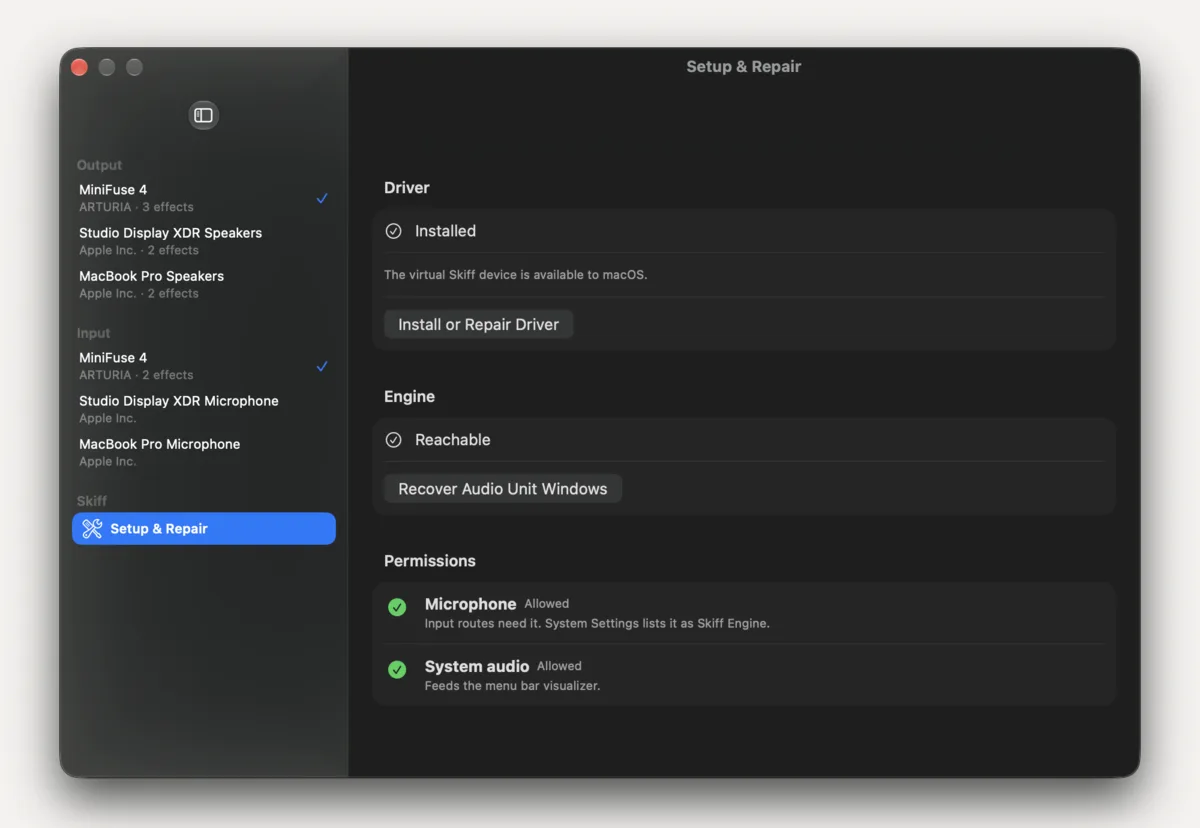
no Skiff device, or Setup & Repair asking for attention - Mic chain won't start
sample rates and microphone permission - Plug-in problems
Failed routes, stuck windows, unexpected stereo - Other audio apps
SoundSource, eqMac, Boom and friends - Visualizer is flat
the menu bar bars aren't moving
04General
Getting Skiff on, off, paid for, and telling us when it breaks.
- Install
from the download to your first chain - Remove
taking out the app, engine, driver and settings - Reporting a bug
what to put in the email - Trial and license
what the trial does, and what $9.99 gets you